
Feature
Design: find out what fits before you buy
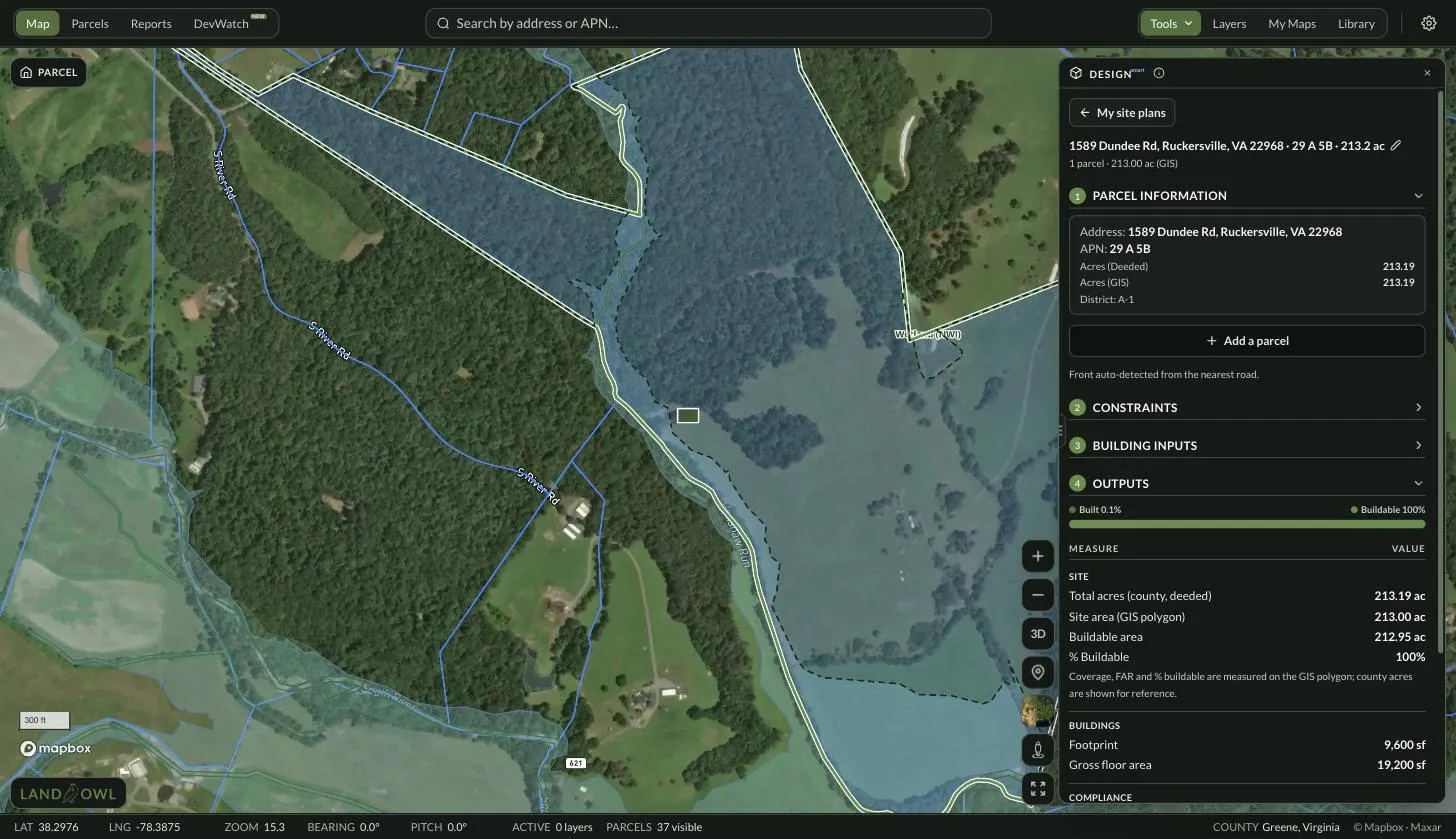
Acreage tells you how big a parcel is. It does not tell you how much of it you can build on. Design takes a parcel you have clicked, subtracts the setbacks you enter and the flood and wetland areas it finds, and draws what is left on the imagery — then lets you drop a building footprint on it and see the numbers.
Land Owl is a parcel intelligence platform for land investors, developers, and researchers — 160M+ U.S. parcels with county-verified ownership, zoning, and infrastructure data on one map.
What is Design in Land Owl?
Design is a screening tool for the question every land deal turns on: how much of this parcel is actually usable? You pick one or more touching parcels, type in the setbacks that apply, and Land Owl draws the buildable envelope — the area far enough from every lot line — directly on the satellite imagery.
It also carves out what you cannot build on. Design checks the parcel live against FEMA's National Flood Hazard Layer and the National Wetlands Inventory, and subtracts anything it finds from the buildable area rather than leaving you to eyeball it.
Then you place a building. Give it a width, a depth and a number of storeys and drag, rotate and resize it inside the envelope — or let Land Owl auto-place the largest footprint that fits. Footprint, gross floor area, lot coverage and FAR update as you move it.
Each of these is saved as a Site Plan, so you can come back to a parcel you were working on rather than starting over.
Who is it for?
People who need a defensible first answer on a parcel before they spend money getting a real one. Design is a desktop screen, not a substitute for a surveyor or a civil engineer — it is what you do the week before you decide whether to pay for either.
- Land buyers checking whether a lot can take the house, shop or barn they have in mind
- Developers sizing a site quickly across a shortlist before committing to due diligence
- Builders and contractors sanity-checking a footprint against a client's setbacks
- Investors comparing two parcels where the acreage is similar but the usable area is not
- Anyone who has been surprised by how much of a lot a floodplain or a wetland takes out
How does it work?
Click a parcel on the map, then open Design from the Tools menu (or press S) and choose Site a Building. The panel walks through four numbered steps.
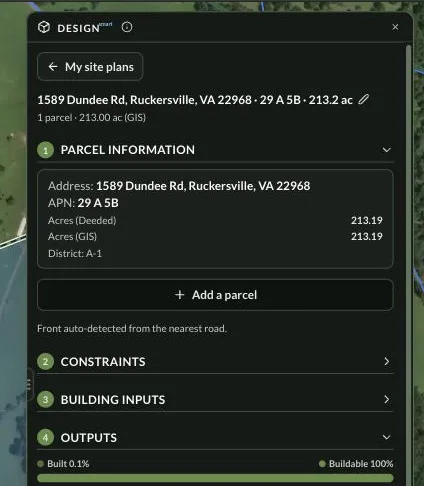
1 · Parcel information
The parcel you clicked becomes the site, with its address, APN, deeded acreage and zoning district carried across. Add a parcel to assemble touching lots into one site. Land Owl picks the front lot line from the nearest road, and tells you when it cannot find one so you can set it yourself.
2 · Constraints
Enter the setbacks — a simple front and all-other-edges pair, or a value per edge. Optionally add max FAR, max lot coverage and max storeys if you know the parcel's limits. Flood and wetland screening runs against FEMA and the NWI and can be subtracted from the buildable area, with an optional buffer from their edges.
3 · Building inputs
Set a width, a depth and a number of storeys, then place the building — or use Auto-place max footprint to have Land Owl grid-search the envelope for the largest one that fits. Drag it to move, use the stem handle to rotate, and drag a corner to resize. Add more than one building on the same site.
4 · Outputs
Site area, buildable area and % buildable, then footprint, gross floor area, lot coverage, FAR and storey count for what you have placed — each checked against the limits you entered, and a note telling you whether the building sits inside the buildable area.
What you get with Design
| Capability | What it actually does |
|---|---|
| Site | One parcel, or several touching parcels assembled into one site |
| Setbacks | A front and all-other-edges pair, or a separate value for each edge — the front lot line is detected from the nearest road |
| Buildable envelope | Drawn live on the satellite imagery as you change the numbers |
| Flood and wetlands | Checked against FEMA's National Flood Hazard Layer and the National Wetlands Inventory, and subtracted from the buildable area, with an optional edge buffer |
| Building footprint | Rectangular, with width, depth and storeys — drag to move, rotate, and resize by the corners |
| Auto-place | Finds the largest footprint that fits inside the envelope |
| Readouts | Site area, buildable area, % buildable, footprint, gross floor area, lot coverage, FAR and storeys |
| Limit checks | Max FAR, max lot coverage and max storeys — checked against values you enter, and skipped if you leave them blank |
| Site Plans | Named automatically from the address, APN and acreage; rename, duplicate, hide, show on the map, or delete |
What Design does not do
It is a screening estimate, not a survey, and the product says so on the panel. Parcel lines come from county tax geometry rather than a surveyed plat, so treat the envelope as a first read and confirm the boundary before any design or purchase decision.
It does not know your zoning code. Setbacks, max FAR, max coverage and max storeys are values you type in — Land Owl checks the building against them, but it does not look them up, and it does not tell you whether what you have drawn would be approved. The zoning district is shown for reference only.
It screens flood and wetlands and nothing else. Soils, slope and hazardous sites are map layers you can switch on to look at, but they never reduce the buildable area. Nor does terrain: there is no grading, cut-and-fill or slope calculation anywhere in the tool, and buildings are flat footprints with a storey count, not 3D massing.
You can place buildings and nothing else — no roads, driveways, septic fields, wells, ponds, parking or lot splits. Footprints are rectangles. And a Site Plan lives in the browser you made it in: it is not saved to your account, cannot be exported to PDF or CAD, and cannot yet be shown to anyone you share the map with.
Related terms
Design: FAQ
Does Design know my county's setbacks?
No. You enter the setbacks yourself, along with any max FAR, lot coverage or storey limits you want checked. Land Owl draws and checks against the numbers you give it — verify them with the county before you rely on them.
Does it subtract floodplain and wetlands from the buildable area?
Yes, if you leave those checks on. Design queries FEMA's National Flood Hazard Layer and the National Wetlands Inventory for the site and carves what it finds out of the envelope, with an optional buffer from their edges. Where a service is unreachable or a county has no flood map, it says so rather than assuming the site is clear.
Can I plan a subdivision or a driveway with it?
Not today. The only object you can place is a rectangular building footprint. There is no lot splitting, no roads or driveways, and no septic, well or utility siting.
Is this accurate enough to build from?
No, and it is not meant to be. Parcel lines are county tax geometry, not a survey, and there is no terrain, grading or code-compliance modelling. Design is for screening a parcel before you commit — an engineer and a surveyor still do the design.
Can I export a Site Plan or share it?
Not yet. Site Plans are saved in the browser you create them in — there is no PDF, image or CAD export, and people you share a map with do not see the plan.
Can I put more than one parcel in a plan?
Yes, as long as they touch. Assembled parcels are treated as a single site with one boundary. Bear in mind that combining lots in reality usually requires consolidation or a replat with the county.
See what actually fits
Setbacks, flood, wetlands and a footprint on one map — free plan, no card.